Build Your Own Secret-Scanning Bot in Node.js — Git History Included
Delete a token from config.env and a scan of the working tree comes back clean. The token is still in Git history, one git log -p away from anyone who clones the repo. Off-the-shelf scanners usually make you pick a workflow, an output format, and a place for the results to go. When you embed the scanner, you make those choices.
The kingfisher-secret-scanner npm package runs the Kingfisher Rust engine in-process through Node-API. It reads Git objects directly, with no git binary required. It streams typed findings as each file finishes. It can ask providers whether a leaked key still works. Native work runs off the event loop, so a bot or web service keeps handling requests while it scans. It supports ESM and CommonJS and ships TypeScript declarations. Get it on npm.
A pull request bot in under 30 lines
Install the SDK in a project on Node.js 22.13 or later:
Save this as pr-secret-bot.mjs. It scans only the file versions the branch added or changed since a base ref. It checks whether each credential still works, then prints GitHub Actions annotations that show up inline on the pull request diff.
import { Scanner, Validator, gitInputs } from 'kingfisher-secret-scanner'

const base = process.argv[2] ?? 'origin/main'
const scanner = await Scanner.create()
const validator = new Validator({ timeoutMs: 5000, concurrency: 4 })
let blocking = 0

try {
  // Only the blobs this branch adds or changes since `base`.
  const changes = gitInputs('.', { mode: 'diff', refs: ['HEAD'], sinceCommit: base })
  for await (const { input, findings } of scanner.scanInputs(changes)) {
    const candidates = findings.filter(finding => finding.visible)
    if (candidates.length === 0) continue

    // Pass every finding so paired values resolve; check only the visible ones.
    for (const { finding, outcome } of await validator.validate(findings, { candidates })) {
      const { line, column } = finding.location
      const level = outcome === 'verified_inactive' ? 'warning' : 'error'
      console.log(`::${level} file=${input.path},line=${line},col=${column}::${finding.ruleId} (${outcome})`)
      if (level === 'error') blocking += 1
    }
  }
} finally {
  await Promise.all([scanner.close(), validator.close()])
}
process.exitCode = blocking > 0 ? 1 : 0
Wire it into a workflow. fetch-depth: 0 gives the job the base branch to diff against:
on: pull_request
jobs:
  secrets:
    runs-on: ubuntu-latest
    steps:
      - uses: actions/checkout@v4
        with: { fetch-depth: 0 }
      - uses: actions/setup-node@v4
        with: { node-version: 22 }
      - run: npm install kingfisher-secret-scanner@latest
      - run: node pr-secret-bot.mjs origin/${{ github.base_ref }}
The policy is yours to set. This one is strict. A key the provider confirms is dead gets a warning. Anything else blocks the merge, including a live key, an unreachable provider, or a rule with no live check. You could just as easily post a PR comment, open a ticket for verified_active findings only, or send them to Slack.
A few things the bot gets right without extra code:
- It scans what changed, not the whole repo.
mode: 'diff'yields only the files whose content atHEADdiffers fromsinceCommit, so the check stays fast on large repositories. To also catch a key that was added and then removed within the branch, switch tomode: 'history'with the samesinceCommit. That scans every commit the branch adds. For a pre-commit hook, use'staged'. - Paired credentials resolve. Some keys only work as a pair, such as an AWS key ID and its secret. Passing the full
findingsbatch lets the validator find the other half.candidateslimits which findings get a live check. - Secrets stay out of the log. The annotations carry only the rule ID and position. When you need a structured report,
toJSON()redacts the secret and captures by default.
Find what's still in history
A PR bot catches new leaks. To audit what has already landed, scan the working tree and every reachable commit with the same scanner:
import { Scanner, filesystem, gitInputs } from 'kingfisher-secret-scanner'

const root = process.argv[2] ?? '.'
const scanner = await Scanner.create()

async function report(inputs) {
  for await (const result of scanner.scanInputs(inputs)) {
    if (result.findings.some(finding => finding.visible)) {
      console.log(JSON.stringify(result.toJSON()))
    }
  }
}

try {
  await report(filesystem([root]))
  await report(gitInputs(root, { mode: 'history', refs: ['HEAD'] }))
} finally {
  await scanner.close()
}
Each ScanResult arrives as soon as its input finishes. For Git inputs, it carries the commit and blob identifiers, so you can see where a deleted key lives on. Set refs: null to walk every local branch and tag, not just HEAD.
The same Scanner works in other places too. In an editor extension, pass an unsaved buffer straight to scan() and flag a key before it's ever written to disk. In a review dashboard, call scanFile() on each changed file. In an upload service, add expandArchives() to the input pipeline to look inside zips and tarballs. See the JavaScript and TypeScript SDK guide.
Why it's fast enough for every push
Scanner.create() compiles the built-in rules into a single Vectorscan database. Vectorscan uses SIMD instructions to match every rule in one pass over the bytes. It doesn't run a separate regex per rule. Only the candidates it finds go to Rust regexes for capture confirmation and rule filters. Create one scanner per process and reuse it, so you pay the compilation cost once. See the matching architecture.
See it all in Kingfisher Workbench
Workbench is a small Node app built on the SDK. It scans the working tree and Git history, shows live progress, and turns results into a searchable, redacted HTML report. Its demo creates a temporary repository with two synthetic tokens. One is current and active. The other was removed from the working tree, still appears in history, and comes back inactive from a local mock provider.
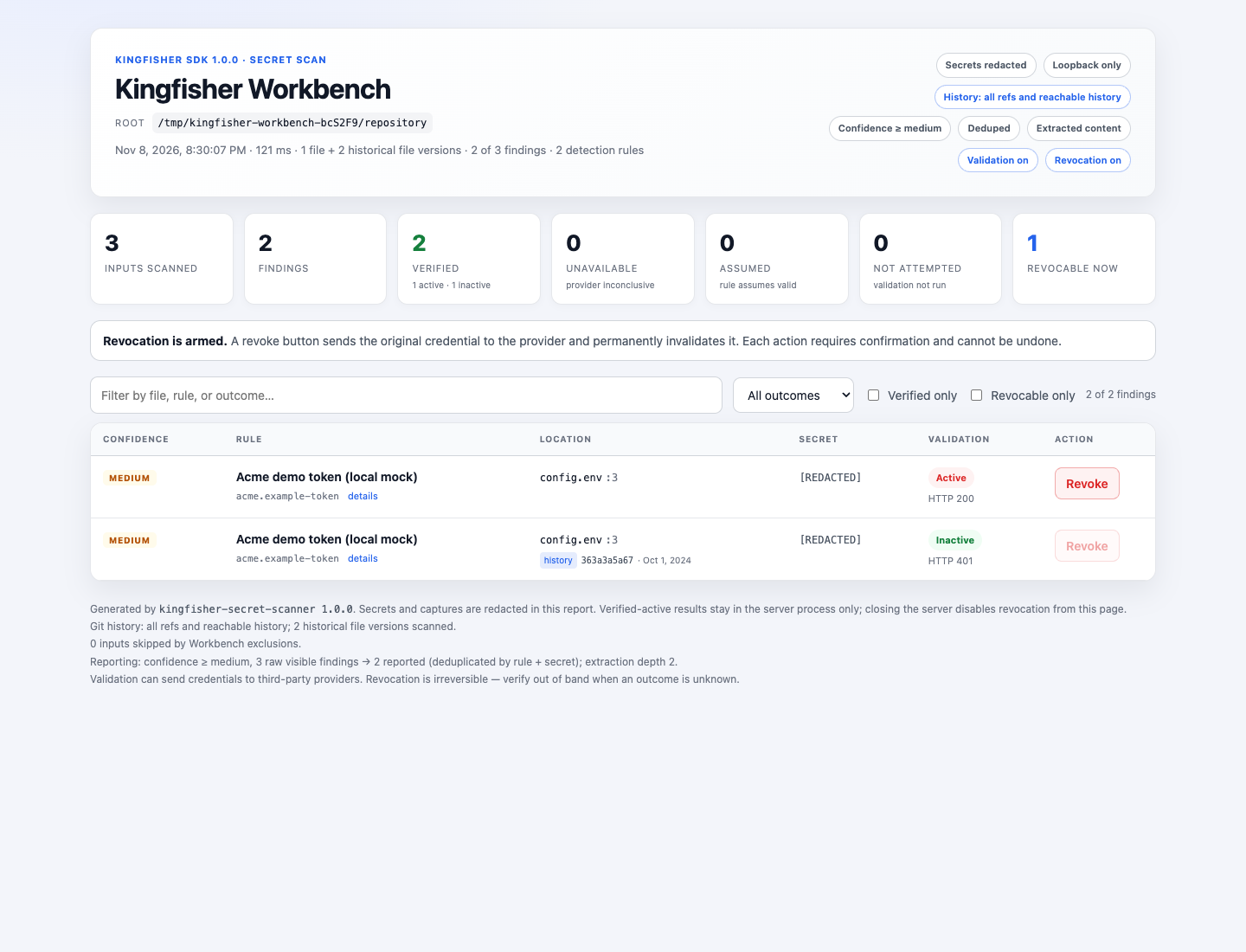
From javascript/ in a checkout with the native SDK built, run the demo and open the local URL it prints. The setup steps are in the Workbench walkthrough.
To try validation without contacting a real provider, run the local validation example. It scans a synthetic token, proves it's active against a mock server on localhost, and can revoke it.